
Shadow Fight 2 for iOS: Download & Play on iPhone/iPad
Download, features, requirements and gameplay, everything you need before you install Shadow Fight 2 on iPhone or iPad.
Official App Store install || Requires iOS 13.0+ || Free, with in-app purchase
If you’ve searched for Shadow Fight 2 for iOS, you’re probably trying to work out one of a few things: whether the game actually runs on your iPhone or iPad, what it takes to install it properly, or why something went wrong after you downloaded it. This guide covers all of that in one place the official installation steps, the iOS and iPadOS versions the game needs, what’s free versus what costs money, and how the touchscreen controls hold up in practice.
It also explains the difference between installing through the App Store and picking up a file from a third-party site, since that distinction matters more on iOS than on Android. Whether this is your first install or you’re troubleshooting a crash, the headings below let you jump straight to what you need.
What Is Shadow Fight 2?
A side-view fighting game that trades a character roster for one silhouette fighter you build up yourself.
Shadow Fight 2 is a fighting game from Nekki that blends one-on-one martial arts combat with RPG-style progression. Instead of picking from a cast of finished characters, you build up a single silhouette fighter across a campaign split into several acts, each closing with a boss fight against one of Shadow’s demon generals.
Winning fights and completing quests earns coins and gems, which go toward new weapons, armour, and enchantments rather than a simple experience bar. A different blade or pair of gloves changes reach, speed, and available combos, so gear choices matter as much as raw levels. The silhouette art style, dark, detailed fighters over painted backdrops is part of why the game still looks distinct years after release.
What Is Shadow Fight 2 for iOS?
The same game as Android, published natively for iPhone and iPad under Nekki.
On iPhone and iPad, Shadow Fight 2 is the same game found on Android, published on the App Store under the developer Nekki (the listing itself credits the publishing entity Mobilnye Igry OOO). It isn’t a cut-down port the full campaign, weapon and armour system, upgrades, and the RAID multiplayer mode are all present, and your progress stays tied to the game’s account system across sessions.
Don’t mix these up
Nekki also publishes a separate paid title, Shadow Fight 2 Special Edition, with its own App Store listing, its own price, and an extra story chapter. It’s a different app from the free base game.
Is Shadow Fight 2 Available for iOS?
Yes, it’s an official, long-standing App Store title, not a workaround or emulator trick.
Shadow Fight 2 is officially distributed through the App Store for iPhone, iPad, and iPod touch, and has been for years. According to the current App Store listing, it requires iOS 13.0 or later on iPhone and iPadOS 13.0 or later on iPad. The download is free, though the game offers optional in-app purchases. Shadow Fight 2 for iOS availability can vary slightly by region, and minimum OS requirements shift over time, so it’s worth checking the listing yourself before installing on an older device.
If you’re weighing up other platforms too, the site’s guide to Shadow Fight 2 on PC and Mac covers emulator-based setups for desktop, which work differently from the native iOS install described here.
How to Download Shadow Fight 2 on iPhone or iPad
Yes, it’s an official, long-standing App Store title, not a workaround or emulator trick.
How to Download Shadow Fight 2 for ios From Our Site
The button above takes you straight to the official listing, no extra file, no extra steps.
To make this easier, the Get it on the App Store button at the top of this page links directly to Shadow Fight 2’s official App Store listing, instead of making you search for it by hand. Tap it, and the App Store opens on the correct page — from there it’s the same Get button and installation flow described above.
Unlike the Android side of this site, this iOS page doesn’t host a separate installable file. On iPhone and iPad, the App Store is the only channel that installs and updates apps without extra setup, so pointing straight to it is the most reliable way to end up with a working, up-to-date copy of the game.
Shadow Fight 2 for iOS Requirements
Everything the App Store listing confirms, in one glance.
|
Requirement |
Details |
|
App name |
Shadow Fight 2 |
|
Developer |
Nekki (listed as Mobilnye Igry OOO) |
|
Platform |
iOS / iPadOS |
|
iPhone compatibility |
Requires iOS 13.0 or later |
|
iPad compatibility |
Requires iPadOS 13.0 or later |
|
Current version |
2.46.0 at time of writing |
|
App size |
Around 353 MB (varies by device/region) |
|
Price |
Free to download |
|
In-app purchases |
Yes, roughly $0.99 to $9.99 |
|
Age rating |
13+ |
Version, size, and pricing change as Nekki pushes updates treat this as a snapshot; the App Store listing always shows current figures.
Shadow Fight 2 Features on iOS
Nothing is trimmed for mobile, weapons, upgrades, bosses, and RAID all carry over in full.
Weapons & armour
Weapon and armour choice plays a major role in Shadow Fight 2. Each weapon has different speed, reach, and combos, while armour balances movement and protection. Coins and gems earned from fights are used to upgrade gear, making progression about finding the right setup for your playstyle. The site’s Shadow Fight 2 weapons guide breaks down which pairings work best against which opponents.
Character upgrades & enchantments
Beyond weapons and armour, individual pieces of gear can be enchanted and upgraded on their own stat lines things like critical hit chance, stamina regeneration, or resistance to specific attack types. This spreads progression across many small decisions instead of one experience bar, so two players at the same story chapter can end up with noticeably different builds depending on which stats they leaned into.
Shadow Fight 2 for iOS Boss fights
Every act in the campaign ends with a named boss one of Shadow’s demon generals and each has a distinct fighting style and attack pattern rather than just higher stats than regular enemies. Later bosses in particular expect players to have upgraded their gear along the way; going into a late-game boss fight with early-game equipment is one of the more common reasons players get stuck.
RAID mode
RAID is Shadow Fight 2’s multiplayer mode, built around clan-based team battles rather than the single-player campaign. It runs separately from the story mode, uses its own progression and rewards, and needs an active internet connection to play, unlike most of the campaign.
Story campaign
The story follows the silhouette fighter’s journey after accidentally opening the Gates of Shadows and losing his physical form. It’s told through short cutscenes between chapters rather than lengthy dialogue, which keeps the pacing focused on fighting rather than reading.
Visual style
Fighters are rendered as dark, detailed silhouettes set against painted backgrounds a choice that’s stayed consistent since the game’s original release and is part of why it still looks recognisable today, even after multiple engine and UI updates.
Shadow Fight 2 Gameplay on iPhone
Touch controls built around short taps, not long input strings.
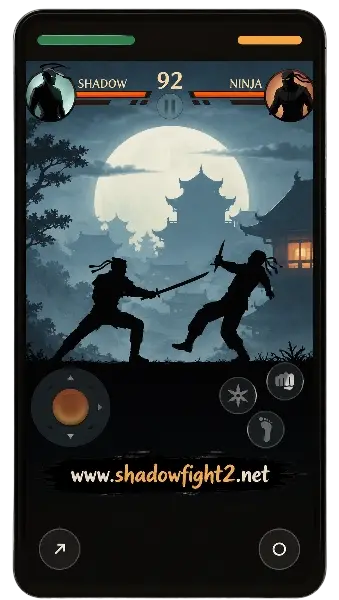
Movement and blocking are handled with on-screen virtual controls a directional pad or swipe area on one side, attack and block buttons on the other. Combos are built from short taps and holds, which keeps fights readable on a smaller screen, though timing blocks precisely takes some getting used to on compact iPhone models.
For players working on technique specifically, the site’s Shadow Fight 2 gameplay tips guide goes deeper than fits here.
Shadow Fight 2 on iPad
Same install, bigger screen but not a redesigned iPad layout.
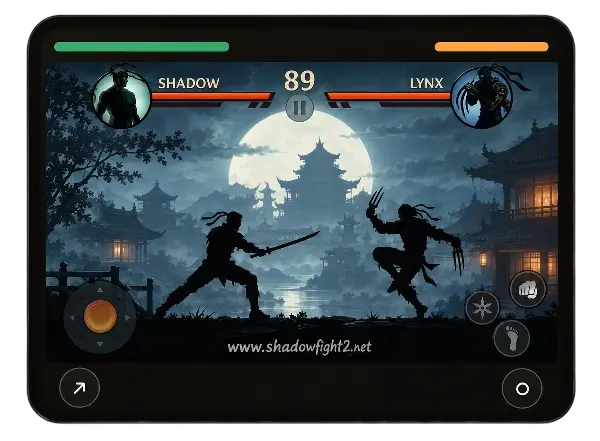
Shadow Fight 2 installs and runs the same way on iPad as on iPhone, using the same iPadOS 13.0-or-later requirement. The larger screen makes spacing between fighters easier to read, which some players find helps blocking timing. That said, the interface is the same phone-style layout scaled up, not a version built around iPad’s extra space a genuine limitation worth knowing before you expect iPad-specific menus.
Is Shadow Fight 2 Free on iOS?
Free to download; optional purchases speed things up but don’t gate the campaign.
The base Shadow Fight 2 app is free to download. Once installed, it offers optional in-app purchases mainly gem packs and a starter bundle that let you skip some of the coin-and-gem grind, but nothing in the campaign is locked behind a paywall in a way that stops you from playing. This is separate from Shadow Fight 2 Special Edition, which charges an upfront price for extra content instead.
Does Shadow Fight 2 Work Offline?
The campaign plays offline; RAID and a few background features need a connection.
The core campaign story chapters, boss fights, weapon and armour management can be played without an internet connection once installed. RAID multiplayer needs connectivity, and things like ads, cloud save syncing, and update checks will reach the internet when it’s available. If you’re heading somewhere without signal, open the game once on Wi-Fi first so any pending updates finish beforehand.
Is Shadow Fight 2 Safe on iPhone?
The App Store install is straightforward; unofficial files carry a different risk profile.
Installed through the App Store, Shadow Fight 2 goes through Apple’s standard app review and runs inside the same sandboxing every other App Store title does. The picture changes with unofficial sources modified or “unlocked” IPA files circulating outside the App Store usually require third-party signing services or sideloading tools, since Apple doesn’t allow unsigned apps to install directly.
Worth knowing
Those methods can involve installing configuration profiles or certificates with broader device access than a normal app, won’t receive updates through Apple’s channel, and can stop working without warning if a certificate is revoked. None of this means every unofficial file is harmful, but it’s a materially different risk than an App Store install.
Common Shadow Fight 2 for iOS Problems
Most install and crash issues trace back to one of three causes.
Shadow Fight 2 won’t install
Usually storage space, an outdated iOS version, or App Store restrictions under Screen Time. Check available storage, confirm iOS 13.0 / iPadOS 13.0 or later, and check Screen Time > Content & Privacy Restrictions.
Shadow Fight 2 keeps crashing
Close and reopen the app, then restart the device if that doesn’t help. Confirm you’re on the latest version from the App Store’s Updates tab, since crash fixes usually ship as regular updates.
Shadow Fight 2 won’t update
Check available storage first. An Apple ID signed in under a different country’s App Store than the one the app was installed from can also block updates.
Not enough storage
Apple’s own guide to managing iPhone and iPad storage walks through checking what’s using space and clearing it without losing personal data.
Device compatibility problems
Devices that can no longer update past iOS 12 won’t meet the current iOS 13.0 requirement the App Store simply won’t offer the install button. There’s no workaround beyond a newer device.
App Store availability problems
Double-check spelling in search, then confirm your App Store account region. A temporary Nekki-side update or review hold can also cause a short-lived gap.
Shadow Fight 2 Alternatives for iPhone
A few genuinely different options, without ranking them for you.
Shadow Fight 2 Special Edition, also from Nekki, uses the same combat system but adds a paid, ad-free package with an extra story chapter. Shadow Fight 3 moves to fully 3D models and a gear-based RPG structure instead of a coin-and-gold economy, suiting players who want deeper long-term progression. For a longer rundown, see the site’s Shadow Fight 2 alternatives roundup.
Ready to play?
Get the official Shadow Fight 2 for iOS straight from the App Store.
Frequently Asked Questions
Quick, direct answers to the questions this page gets asked most.
Final Thoughts On Shadow Fight 2 for iOS
Shadow Fight 2 for iOS is officially available on iPhone and iPad through the App Store, and getting it installed is about as straightforward as installing any other App Store title search, confirm compatibility, tap Get. The free download includes the full campaign, the complete weapon and armour system, and RAID multiplayer, with in-app purchases sitting alongside that content rather than gating it.
Most installation issues come down to storage, an outdated iOS version, or a Screen Time restriction, and all three are quick to check. If you run across the game offered as a modified file outside the App Store, it’s worth remembering that Apple’s own store is still the only channel that reviews, updates, and secures the app without any extra setup on your part.